

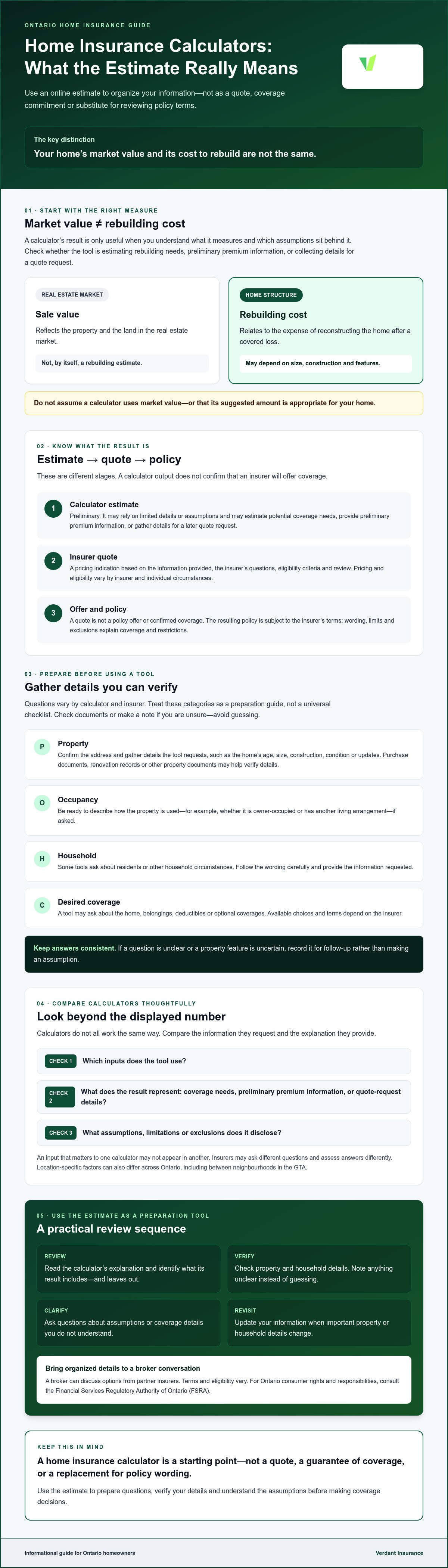
Your home’s market value and the cost to rebuild it are not the same, so the sale price alone won’t tell you how much building coverage you may need. A home insurance calculator Ontario homeowners use can offer a starting estimate, but the result is only as useful as the details entered and the assumptions behind it.
A quick estimate can help you prepare before speaking with an insurer or broker. It is not an insurance quote or a guarantee that your coverage will meet your needs. The final price and available coverage depend on the insurer, your property and the options you choose.
This guide explains what a calculator may estimate, which home and coverage details can affect its result, and why rebuilding cost matters more than market value when estimating the home’s structure. You’ll also learn what information to gather, how online estimates can fall short, and how to use your results to prepare for a personalized quote and a conversation with an Ontario broker.
Key Takeaways
- A home insurance calculator Ontario homeowners use is most helpful when you understand the assumptions behind its result, not just the displayed number.
- Gather property, occupancy, household and coverage details before using a calculator. Check documents or make a note if you are unsure of an answer instead of guessing.
- Compare calculators by the information they request, the coverage basis they show and any limitations or exclusions they disclose.
- Review the estimate’s assumptions and clarify anything that is unclear. Revisit the information when important property or household details change.
- Bring your organized details to a broker conversation to discuss options from partner insurers. Terms and eligibility vary.
What does a home insurance calculator in Ontario actually estimate?
A home insurance calculator is a starting point, not a coverage commitment. Depending on the tool, it may estimate potential coverage needs, provide preliminary premium information or collect details for a quote request. Its result can help you plan, but it does not replace an insurer’s assessment or the terms of an issued policy.
Your home’s sale value and rebuilding cost serve different purposes. Sale value reflects the property and land in the real estate market. Rebuilding cost relates to the expense of reconstructing the home after a covered loss, based on factors such as its size, construction and features. Check what a calculator measures instead of assuming it uses market value.
What information can an online calculator provide?
Calculators do not all work the same way. One may provide a preliminary view of potential coverage needs or premium information; another may collect property details to support a later quote request. Read the tool’s explanation to see which inputs it uses, what its result represents and what it leaves out. If you do not know an answer, avoid guessing and make a note to clarify it.
For context on Ontario’s insurance regulator, the Financial Services Regulatory Authority of Ontario (FSRA) provides an overview of the organization. A calculator result does not confirm that an insurer will offer coverage or that a suggested amount is appropriate for your home.
Is an estimate the same as a home insurance quote?
No. An estimate is preliminary and may rely on a limited set of details or assumptions. A quote is an insurer’s pricing indication based on the information provided and the insurer’s questions, eligibility criteria and review. Pricing and eligibility vary by insurer and individual circumstances, so do not treat a calculator estimate as the amount an insurer will charge.
A quote is not the same as a policy offer or confirmed coverage. Any offer and resulting policy are subject to the insurer’s terms. The policy wording, limits and exclusions explain what the policy covers and where restrictions apply. Review those documents rather than relying on a calculator summary or displayed figure.
Used carefully, a home insurance calculator Ontario homeowners consult can help organize questions and identify details to verify. Treat its output as a starting point, then clarify the assumptions before making coverage decisions.
Which details should you enter in an Ontario home insurance calculator?
A home insurance calculator Ontario homeowners use is only as useful as the information behind it. Questions vary by tool and insurer, so use these categories as a preparation guide rather than a universal checklist. Answer accurately. If you do not know a detail, check a document or ask someone knowledgeable instead of guessing.
- Property: Confirm the address and gather the basic details the tool requests, such as the home’s age, size, construction, condition or updates.
- Occupancy: Be ready to describe how the property is used, such as whether it is owner-occupied or has another living arrangement, if asked.
- Household: Some tools may ask about residents or other household circumstances. Follow the wording carefully and provide the information requested.
- Desired coverage: A calculator may ask about the home, belongings, deductibles or optional coverages. Available choices and terms depend on the insurer.
Insurers can ask different questions and assess answers differently. An input that matters to one calculator may not appear in another. For guidance on Ontario consumer rights and responsibilities, consult the Financial Services Regulatory Authority of Ontario. Keep your answers consistent and ask for clarification if a question is unclear.
What property details help make an estimate more relevant?
Start with the correct property address and details you can verify. Purchase documents, renovation records or other property documents may help confirm the home’s age, construction and updates. Do not assume that homes in the same Ontario city will be assessed alike. Location-specific factors can differ across the province, including between neighbourhoods in the GTA, and insurers may consider location in different ways. If a feature or update is unclear, note it for follow-up.
How should you think about rebuilding needs and belongings?
Replacement cost refers to the cost to rebuild the home, not its real estate market value, which also reflects the land and local market conditions. If a tool asks about the building, provide the information it requests and check what its estimate includes. Do not use a sale price as a substitute for rebuilding needs.
For belongings, a household inventory can help you answer questions more thoughtfully. List items by room and note larger possessions, using receipts or photos where available. This is preparation, not a recommendation for a particular limit. Review the insurer’s available options and policy wording, including limits and exclusions, before deciding what suits your circumstances. To explore homeowner insurance options in Ontario, visit Verdant’s homeowner insurance page.
How can you compare results from home insurance calculators?
Compare the assumptions behind each result, not just the figures. Calculators may use different questions, coverage categories or methods, so their outputs may not be directly comparable. A lower preliminary estimate does not establish that it includes equivalent coverage or suits your needs.
Use the same property and household information wherever possible. Then record what each tool shows, what it leaves unclear and what you need to confirm before requesting a quote.
What should you check before comparing two estimates?
Check that both calculators use the same address and property details, along with the same occupancy and household information. If a tool shows coverage categories, limits, deductibles or exclusions, record those too. Do not fill gaps with guesses. Write down missing assumptions as questions for the insurer or broker.
| What to compare | What to record |
|---|---|
| Inputs | Property, occupancy and household details entered |
| Estimated coverage basis | What the tool says its estimate represents, including any categories or limits shown |
| Disclosed exclusions | Exclusions, limitations or assumptions the calculator identifies |
| Next steps | Unanswered questions or details to verify before requesting a quote |
If a tool does not disclose its assumptions, mark them as unknown rather than treating them as equivalent to a tool that provides more detail. For premium context, see Average Cost of Home Insurance in Ontario: 2026 Price Guide. A cost guide and a calculator result serve different purposes, and neither confirms that two options provide equivalent protection.
Why can estimates differ for the same Ontario home?
Insurers may assess property and applicant details differently. Location, home characteristics and selected coverage can all affect a result, but the impact depends on the insurer and information provided. Do not attribute a difference between estimates to one factor without insurer-specific confirmation.
For example, two tools may ask about the same home but use different questions or show different coverage categories. Their outputs can vary even when they relate to the same property. Treat the result from a home insurance calculator Ontario residents use as a prompt to check assumptions, not as a ranking of insurers or policies.
Before comparing options, ask what each result includes, which details still need confirmation and whether the coverage categories and limits shown align. Clear answers make for a more useful quote discussion.
How do you use a home insurance calculator without over-relying on it?
Use the result to identify next steps, not as proof that you have the right coverage. Follow this process:
- Gather property and household details. Use current documents where possible and note anything you are unsure about.
- Complete the calculator carefully. Answer accurately and do not fill gaps with assumptions.
- Review the result and its assumptions. Check what the estimate includes, which information it used and what it does not explain.
- Ask for clarification. Bring unresolved questions to an Ontario broker or insurer before making decisions.
Revisit the estimate if important property or household details change, such as after a renovation or a change in how the home is occupied. Whether the estimate needs updating depends on the information the specific tool uses. It also does not confirm that a future claim would be covered. Coverage is determined by the policy wording, limits and exclusions, subject to the insurer’s terms and your circumstances.
What should you verify before relying on an estimate?
Check for missing, outdated or incorrectly entered details. Read the calculator’s explanation of what its result represents, its limitations and how it uses the information you provide. Write down anything you cannot confirm instead of guessing.
Keep a short list of questions about details that need clarification. For example, ask how the estimate treats rebuilding needs, what limits or exclusions apply, which deductible is shown and where to find the relevant policy wording. A displayed amount alone may not answer these questions.
When should you move from an estimate to a broker conversation?
Ask for help if you are unsure how the tool arrived at its rebuilding assumptions or need to understand the coverage choices it presents. Unusual property features or updates may also be worth discussing directly if the calculator does not capture them clearly. A broker can review your information and discuss available options from partner insurers. Eligibility, pricing and policy terms vary.
For background on choosing an online broker, see Choosing an Online Insurance Broker in Canada: An Ontario Digital Guide. Bring your estimate and list of questions to the conversation. A home insurance calculator Ontario homeowners use can help you prepare, but review the insurer’s quote and policy documents for specific terms and coverage.
What comes after a home insurance calculator estimate in Ontario?
Use the estimate to organize your information and prepare for a more informed quote discussion. Gather the property and occupancy details you entered, note any assumptions the calculator made, and list questions about options that were unclear. This preparation can help you explain your needs, but it does not guarantee eligibility, a particular price or a specific coverage result.
What information should you prepare for a home insurance quote?
Keep your property details together, including the address and any home characteristics requested during the quote process. Have accurate occupancy information available too. If you do not know an answer, flag it so you can confirm it rather than supplying a guess.
Prepare questions about the coverage options being considered, applicable limits, exclusions and deductibles. Ask how the insurer’s proposed terms relate to the details you provided. A quote discussion is also a chance to clarify information that a calculator could not capture. The insurer may need to review additional details before deciding whether it can offer coverage and on what terms.
How can an Ontario broker help you review options?
An insurance brokerage can help you review information and explore homeowner insurance options available through its partner insurers. A broker can also help clarify questions about the estimate and quote process. The brokerage does not underwrite the policy. Each insurer determines eligibility and sets its own policy terms. Pricing, coverage, limits and exclusions can vary by insurer and individual circumstances, so review the specific documents and proposed terms.
If rebuilding assumptions or coverage choices remain unclear, or your home has details that are difficult to describe in an online tool, consider discussing them with a broker. Bring your calculator result and list of unanswered questions. That gives you a practical starting point without treating the estimate as a promise of coverage.
For Ontario homeowners, Verdant Insurance provides access to homeowner insurance through partner insurers. If you would like to review your estimate assumptions and discuss available options, Verdant’s online platform lets you obtain quotes and manage policies, with dedicated support. A home insurance calculator Ontario residents use can help you prepare, while the insurer’s eligibility review and policy documents determine the terms available to you.
Turn Your Estimate Into a More Informed Next Step
A home insurance calculator Ontario homeowners use can organize information and highlight details to verify, but the result is only a starting point. Enter accurate property and household details, compare the assumptions behind estimates, and prepare questions about rebuilding needs, limits, exclusions and deductibles. A calculator estimate is not a quote or confirmation of coverage.
A broker conversation can help you review your information and explore homeowner insurance options through partner insurers. Eligibility, pricing and policy terms vary by insurer and individual circumstances. Verdant Insurance offers online quotes and policy management, backed by dedicated support.
With clear information and the right questions, you can take the next step with greater confidence.
Frequently Asked Questions
Is a home insurance calculator in Ontario accurate?
It can provide a useful preliminary estimate, but it does not guarantee the coverage you need or the price an insurer will offer. Accuracy depends on the information entered and the calculator’s assumptions and methods. Check what the tool measures, verify your answers and note anything it leaves unclear. An insurer’s quote and policy documents provide the specific terms to review.
What information do I need for a home insurance calculator?
It depends on the calculator. It may ask for the home’s address and characteristics, how it is occupied, household details or coverage preferences. Gather accurate information from property documents where possible, and do not guess if a detail is unknown. Calculators and insurers can ask different questions, so treat any checklist as a preparation guide. Note details you need to confirm.
Can a home insurance calculator give me a quote?
Usually, a calculator provides an estimate or helps organize information for a quote request. It is not the same as an insurer-issued quote, policy offer or confirmation of coverage. A quote depends on the insurer’s questions, eligibility review and the details provided. Pricing and eligibility vary by insurer and individual circumstances. Review the policy wording, limits and exclusions to understand the terms offered.
How is the home insurance amount for rebuilding calculated?
Rebuilding cost refers to the estimated cost to reconstruct the home, not its real estate sale value. A calculator may use property information and its own assumptions to estimate potential building coverage needs, but tools differ in what they ask and how they calculate results. Confirm the estimate’s basis, and ask an insurer or broker about unclear assumptions. Do not treat a calculator result as a confirmed limit.
Why do home insurance calculator results differ?
Different calculators may ask different questions, apply different assumptions or show different coverage categories. Insurers may also assess location, property characteristics and applicant details differently. Selected coverage can affect the result too. The reason for a difference cannot be reliably identified from the figures alone. Compare the inputs and assumptions, and ask for clarification instead of assuming a lower estimate includes equivalent coverage.
Does a home insurance calculator use my home’s market value?
Not necessarily. Market value reflects what a property may sell for, including the land and local real estate conditions. Rebuilding cost estimates the cost to reconstruct the home, which serves a different purpose when considering building coverage. A calculator may use different inputs or methods, so check whether it estimates rebuilding needs or something else. Do not use sale price alone as a substitute for rebuilding cost.
Can I use an online calculator to compare Ontario home insurance?
Yes, as a starting point, but compare more than the displayed figures. Check whether each tool uses the same property and household details, what coverage basis it shows, and whether it discloses exclusions or assumptions. Results are not insurer quotes and do not establish that coverage is equivalent. Use your comparison to prepare questions for an Ontario broker or insurer, then review the specific quote and policy terms.